Recall
Dashboard Overview
The Recall module allows users to track and analyze product recalls issued by manufacturers, providing critical data on safety alerts and market withdrawals.
Searching for Recalls
To begin, you must identify the manufacturer or firm associated with the product in question.
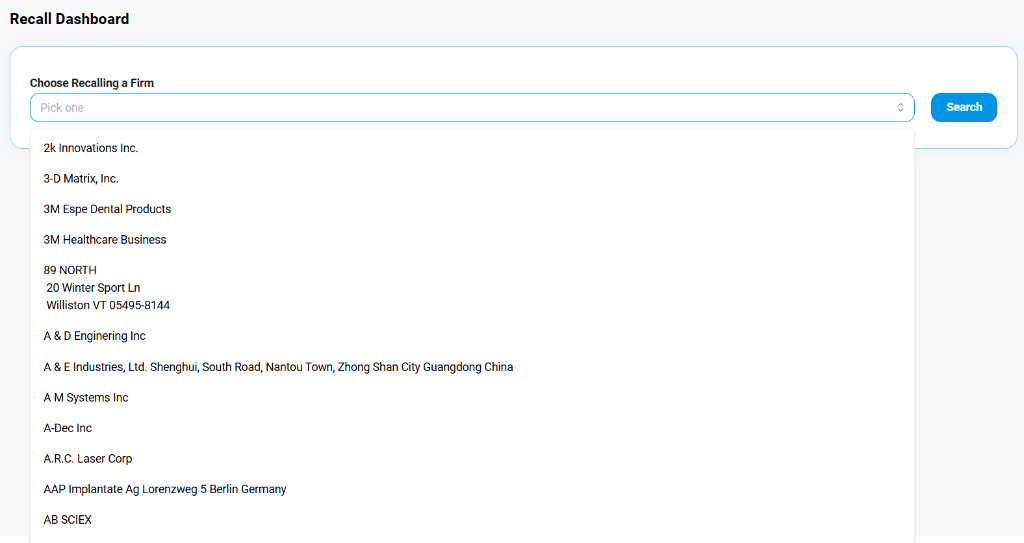
- Choose Recalling Firm: Use the search bar to find the specific company (e.g., "2k Innovations Inc."). The system provides an autocomplete dropdown to help you locate the correct entity.
- Search: Click the Search button to retrieve all historical recall data associated with that firm.
Reviewing Recall Results
Once a firm is selected, the dashboard displays a detailed table of their recalled products.
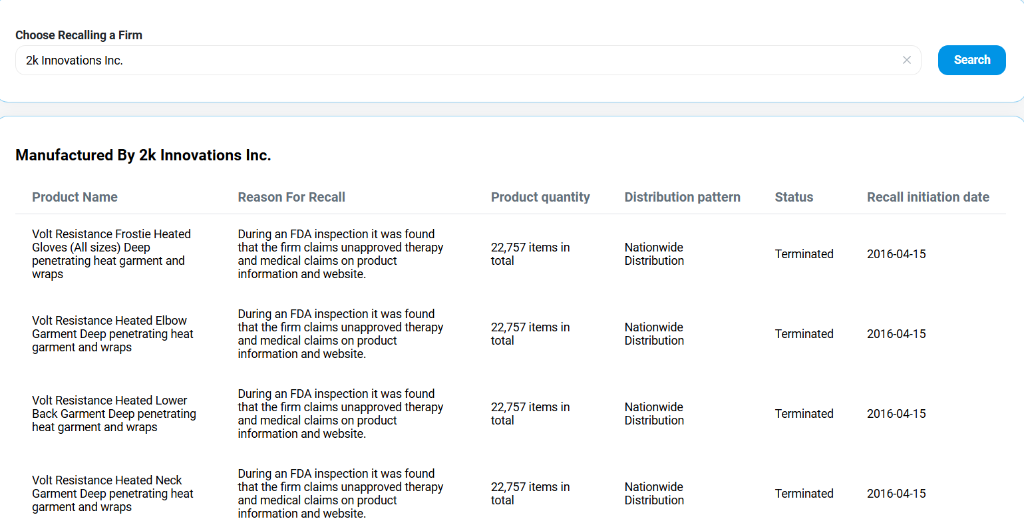
Results Columns
- Product Name: The specific device or item being recalled (e.g., "Volt Resistance Frostie Heated Gloves").
- Reason For Recall: A detailed description of the issue found (e.g., "unapproved therapy and medical claims").
- Product Quantity: The total number of affected units (e.g., "22,757 items").
- Distribution Pattern: The geographic scope of the distribution (e.g., "Nationwide Distribution").
- Status: Current state of the recall (e.g., Terminated, Ongoing).
- Recall Initiation Date: The date when the recall was officially started.