Hazard Analysis Guide
Managing Hazards
The Hazard Analysis interface allows you to view, filter, and manage all identified hazards for your product.
- Grouping: Organize hazards by category (e.g., Electrical, Biological, User Error) for better manageability.
- Listing Page: View a comprehensive list of all identified hazards, filter by severity or status, and export for reporting.
- AI Generation Reference: Leverage AI to suggest potential hazards based on similar device profiles and historical data.
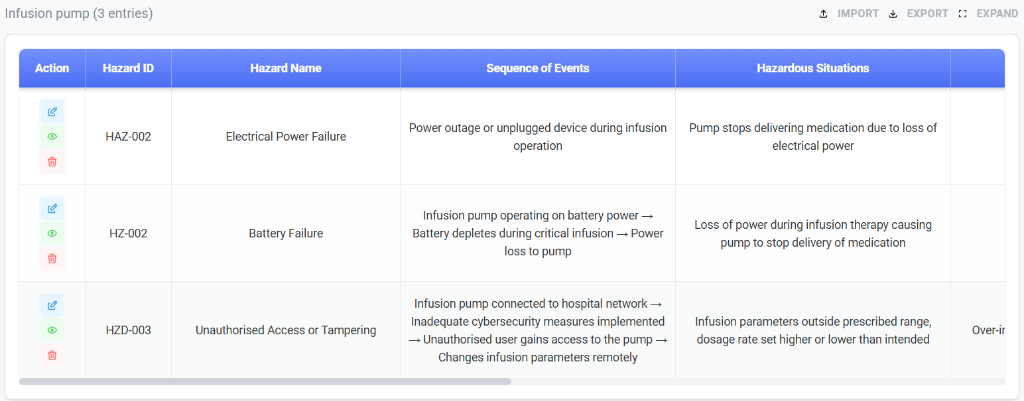
Key columns in the Dashboard:
- Actions: Edit, View, or Delete a hazard entry.
- Hazard ID & Name: Unique identifier and descriptive name for the hazard.
- Sequence of Events: The chain of events leading to the hazardous situation.
- Hazardous Situations: The specific condition in which people, property, or the environment are exposed to one or more hazards.
Adding a New Hazard
When creating a new hazard entry, ensure all critical fields are populated to perform an accurate risk assessment.
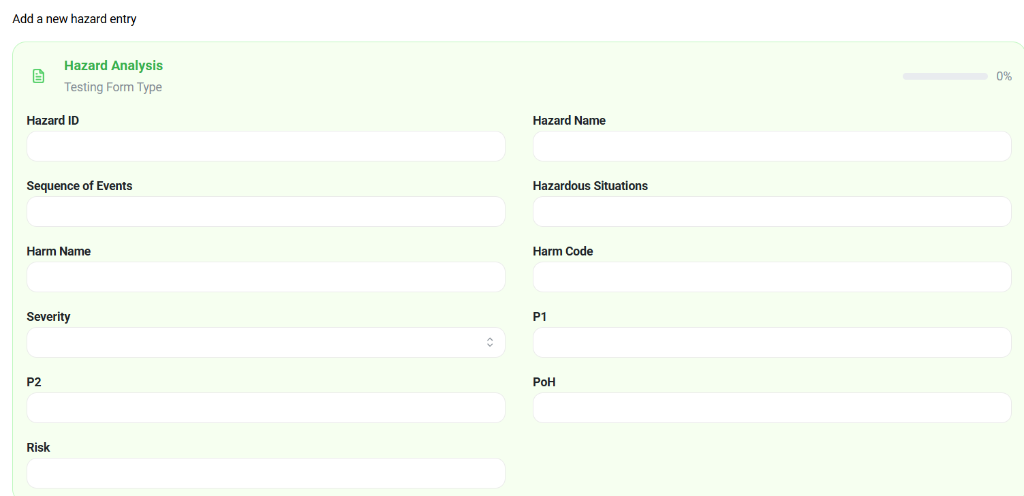
Required Fields:
- Hazard ID & Name: Define a clear, unique ID and name.
- Sequence of Events: Describe the step-by-step process leading to harm.
- Harm Name & Code: Specify the potential harm and its classification code.
- Severity: Rate the severity of the harm if it were to occur.
- P1 & P2:
- P1: Probability of the hazardous situation occurring.
- P2: Probability of the hazardous situation leading to harm.
- Risk: The overall risk score calculated from Severity and Probability (P1 x P2).
Risk Scoring
- Methodology: Likelihood × Severity to compute relative risk.
- Calibration: define scales for likelihood and severity consistent with your QMS.
Mitigation Tracking
- Create corrective actions tied to hazards.
- Track owner, status, due dates, and verification of effectiveness.
- Link mitigations to events or failure modes for traceability.