Audits
Audit Records Dashboard
The Audit Records module provides a comprehensive, immutable log of all activities within the system, ensuring compliance with regulatory requirements (e.g., 21 CFR Part 11).
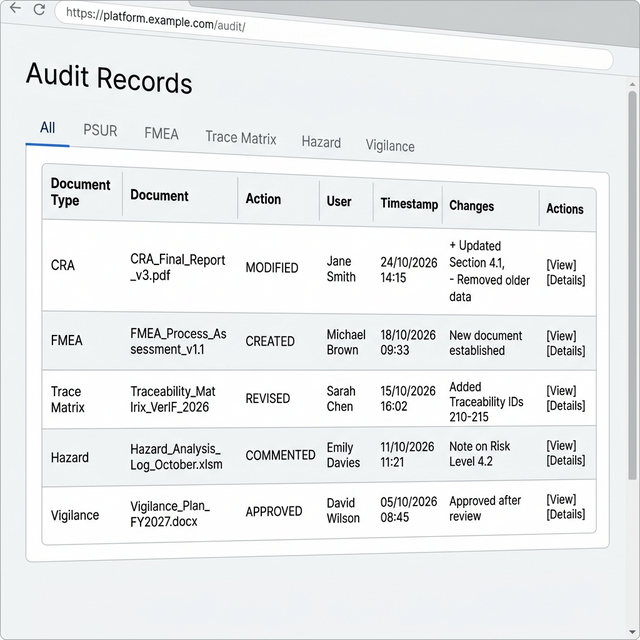
Analyzing the Audit Log
The interface is designed for quick retrieval and review of specific actions.
1. Filtering by Module
Use the top navigation tabs to narrow down records by specific subsystems:
- All: View a consolidated list of all activities.
- PSUR, FMEA, Trace Matrix, Hazard, Vigilance: Select a specific tab to view records relevant only to that module.
2. Refining the Search
- Date Range: Use the period selector (e.g., "Last 7 Days") to isolate activities within a specific timeframe.
- User Filter: Select a specific user from the "User" dropdown to audit individual contributions or changes.
3. Reviewing Records
The data table provides detailed metadata for each event:
- Document Type: The category of the affected file (e.g., CRA, FMEA, TRACEMATRIX-ITEM).
- Document: The specific file name or ID being modified.
- Action: The type of operation performed (e.g., MODIFIED, CREATED, DELETED).
- User: The individual who performed the action.
- Timestamp: Exact date and time of the event.
- Actions: Click the View (Eye Icon) button to see a detailed diff of the changes.