Complaint Letters
Dashboard Overview
The Complaint Letters module simplifies the management and retrieval of official correspondence related to user complaints.
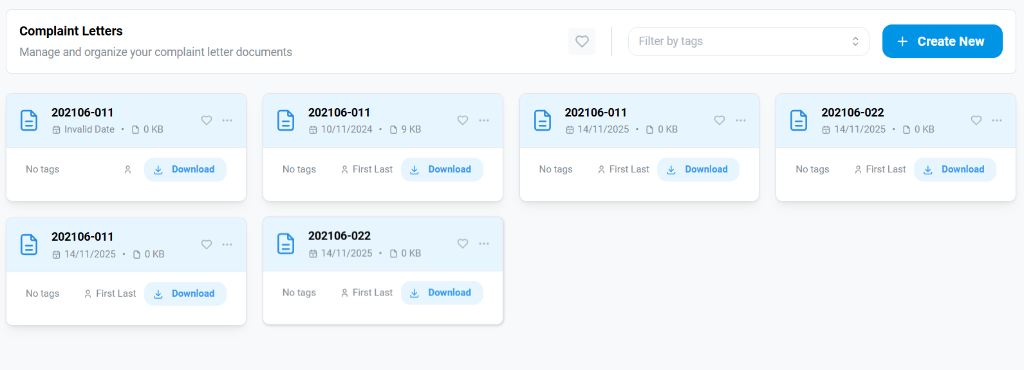
- Create New: Use this button to generate a new set of letters from a raw data file.
- Repository: View, filter (by tags), and manage previously generated letter batches (e.g., "202106-011").
Generating New Letters
To create new documents, you need to provide a valid complaint dataset.
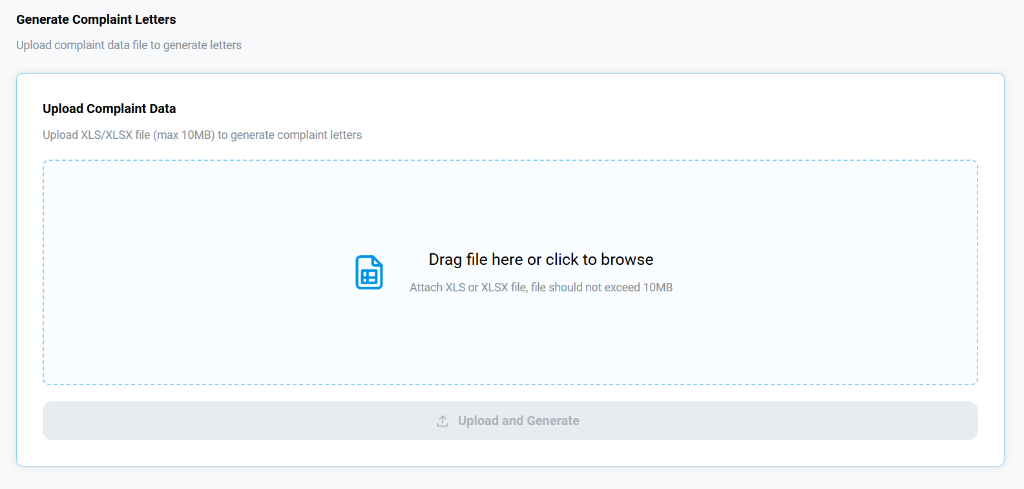
- Upload Complaint Data: Drag and drop or browse to select your source Excel file (
.xlsor.xlsx, max 10MB). - Generate: Once the file is attached, click Upload and Generate. The system will process the rows and create individual letters based on the defined templates.
Downloading Letters
After generation, you can export the letters in multiple formats.
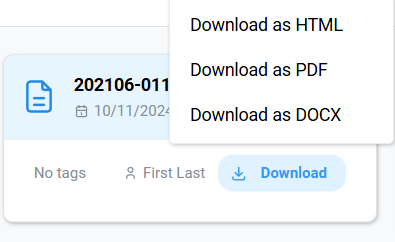
- Download Button: Click
Downloadon any card to access the export menu. - Formats:
- Download as HTML: Best for quick web viewing.
- Download as PDF: Standard format for printing and sharing.
- Download as DOCX: Editable Word document format for further customization.