Support Center
We are dedicated to ensuring your success with DataReality. Whether you're facing a technical issue, have a question about compliance, or need to upgrade your license, our team is here to help.

Support Dashboard
Manage your interactions with our support team directly through the customized Support Dashboard.
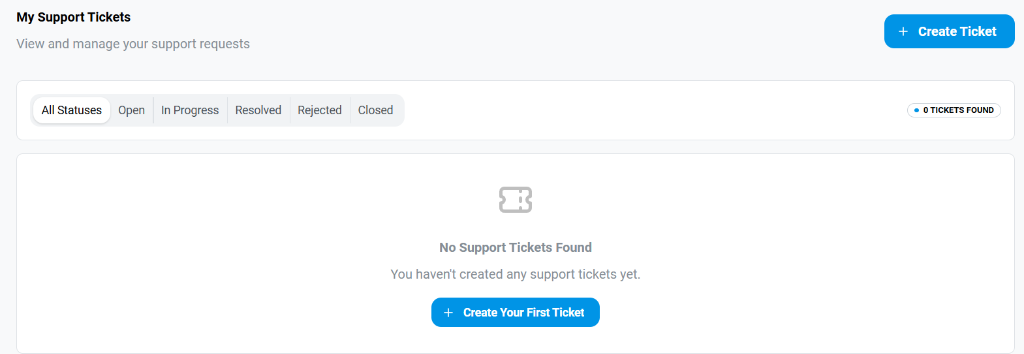
The dashboard provides a centralized view of all your support tickets with the following capabilities:
-
Ticket Management:
- Create Ticket: A prominent blue button allows for the immediate creation of new support requests.
- Status Indicators: Quickly filter your view using tabs for All Statuses, Open, In Progress, Resolved, Rejected, and Closed tickets.
- Ticket Counter: A dynamic label (e.g., "0 TICKETS FOUND") shows the count of tickets matching your current filter.
-
Empty State Guidance: When no tickets are present, the system provides a clear "No Support Tickets Found" message along with a direct call-to-action to Create Your First Ticket.
Create Ticket Modal
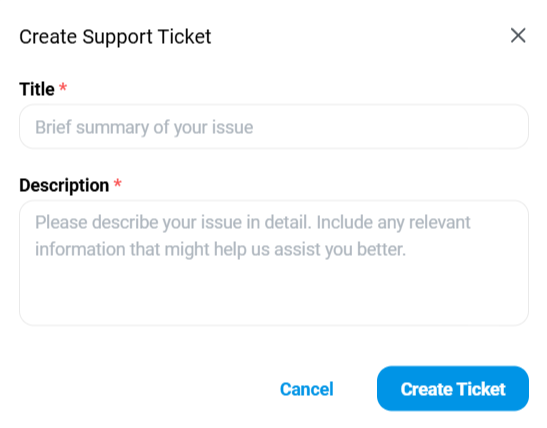
Clicking Create Ticket opens a focused modal window designed to capture essential details:
- Title: A mandatory field for a brief summary of the issue.
- Description: A detailed text area where you can elaborate on the problem, including steps to reproduce or specific error messages.
- Action: The Create Ticket button submits the request directly to our support queue.
Ticket Status & Management

Once tickets are created, you can track their progress through the list view:
- Status Tabs: Use the tabs at the top (e.g., Open, Resolved) to filter the list and focus on active issues.
- Ticket Details: Each row displays key information:
- Title: The summary of the issue.
- Created Date: When the ticket was submitted.
- Status: The current state (e.g., OPEN).
- Action: Clicking View takes you to the detailed conversation thread for that ticket.
Viewing Ticket Details
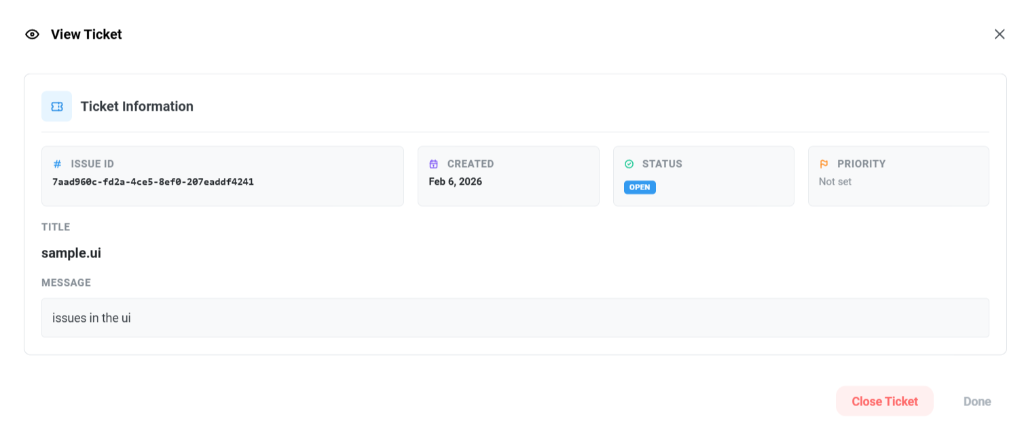
Selecting a ticket opens the full detail view where you can see:
- Ticket Information:
- Issue ID: A unique alphanumeric code for tracking.
- Created: Date of submission.
- Status: Current status (e.g., OPEN).
- Priority: Assigned priority level.
- Conversation History: Read the full description (Message) and any responses from our support team.
- Actions:
- Close Ticket: Mark the issue as resolved.
- Done: Return to the main dashboard.
Contact Channels
🆘 Technical Support
For product bugs, downtime, or account access issues.
- Email: support@thedatareality.com
- Portal: https://nui.thedatareality.com/support
- SLA: 24-hour response time for Standard plans; 4-hour for Enterprise.
💼 Sales & Licensing
For plan upgrades, additional seat licenses, or enterprise agreements.
- Email: sales@thedatareality.com
- Phone: +1 (800) 555-0199 (Mon-Fri, 9am-5pm EST)
💬 Community & Discussion
Join other professionals to discuss best practices for PSUR generation and risk analysis.
- Slack:
#datareality-users(Invite only) - Forum: community.thedatareality.com
Self-Service Resources
Before reaching out, check if your question is answered in our documentation.
Famous How-To's
System Status
Check the real-time status of our API and dashboard services.