IntelliRisk
IntelliRisk is the central hub for managing all your risk analysis and traceability projects. It allows you to create, configure, and track complex compliance projects—including FMEA, Hazard Analysis, Trace Matrices, and Cybersecurity Risk Assessments (CRA)—in a unified interface.
1. Project Dashboard
Access the IntelliRisk module from the main navigation sidebar. The dashboard provides a high-level view of all active and draft projects.
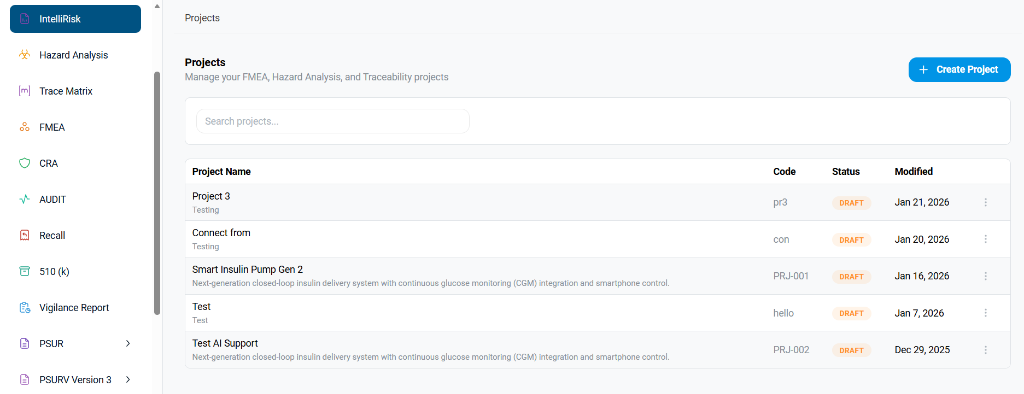
- Projects List: View all projects with key metadata such as Project Code, Status (e.g., Draft, Active), and Last Modified Date.
- Search: Use the search bar to quickly find projects by name or code.
- Create Project: Click the blue + Create Project button to start a new initiative.
2. Creating a New Project
When you initialize a new project, you will need to define its core identity and scope.
Step 2.1: Define Project Details
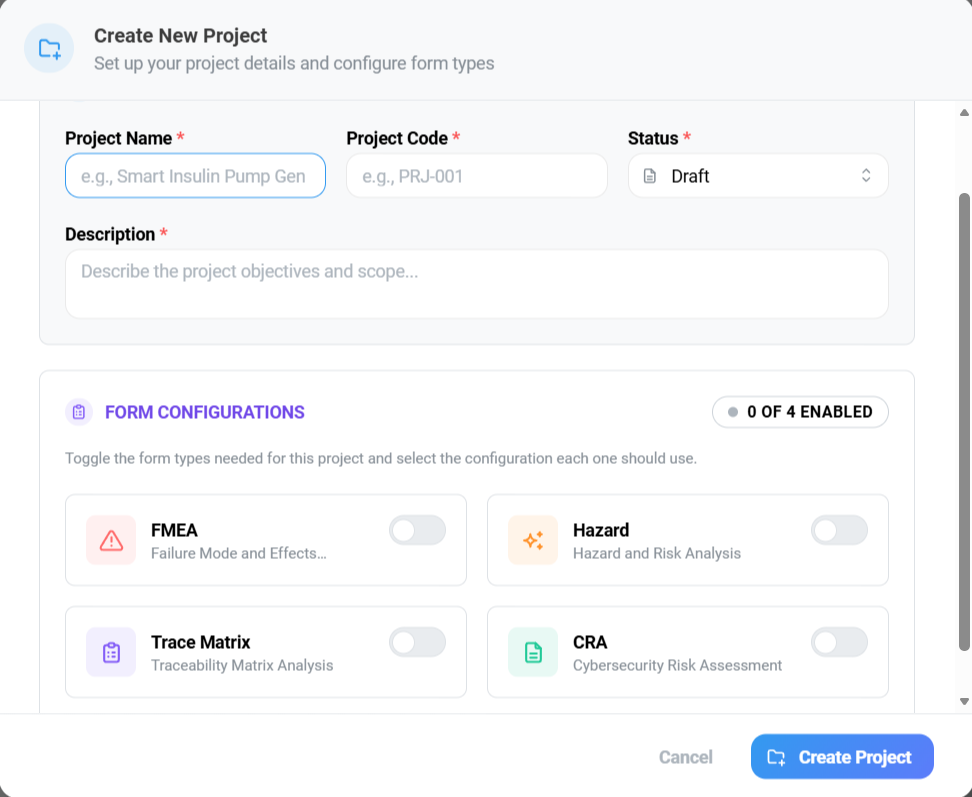
- Project Name: Enter a unique and descriptive name (e.g., "Smart Insulin Pump Gen 2").
- Project Code: Assign a distinct code for internal tracking (e.g., "PRJ-001").
- Status: Set the initial status, typically starting as
Draftduring setup. - Description: Provide a brief summary of the project's objectives and scope.
Step 2.2: Configure Forms
IntelliRisk allows you to modularize your project by enabling only the necessary risk management components.
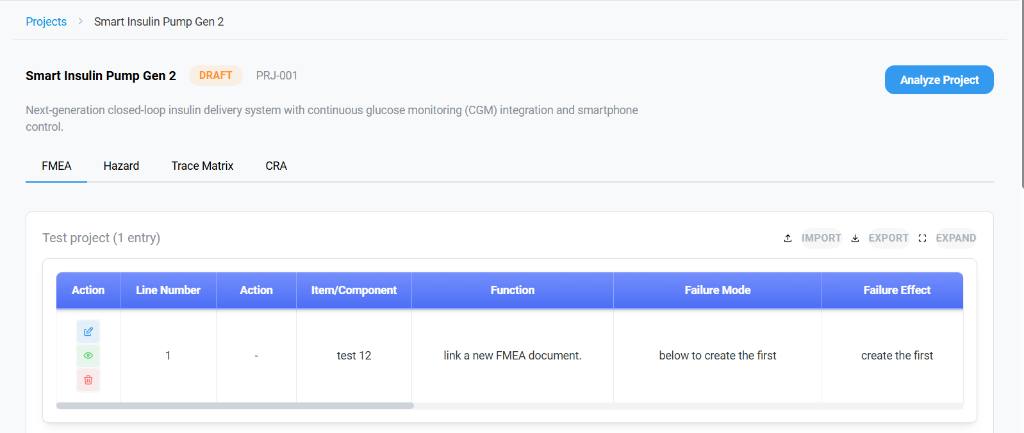
Toggle the switches to enable the specific forms required for this project:
- FMEA: Failure Mode and Effects Analysis.
- Hazard: Hazard and Risk Analysis.
- Trace Matrix: Traceability Matrix Analysis.
- CRA: Cybersecurity Risk Assessment.
Click Create Project to finalize the setup.
3. Execution & Analysis Modules
Once a project is created, click on its name to enter the workspace. You can switch between the active analysis modules using the top tabs.
3.1 Failure Mode and Effects Analysis (FMEA)
The FMEA tab allows you to systematically identify potential failure modes and their effects.
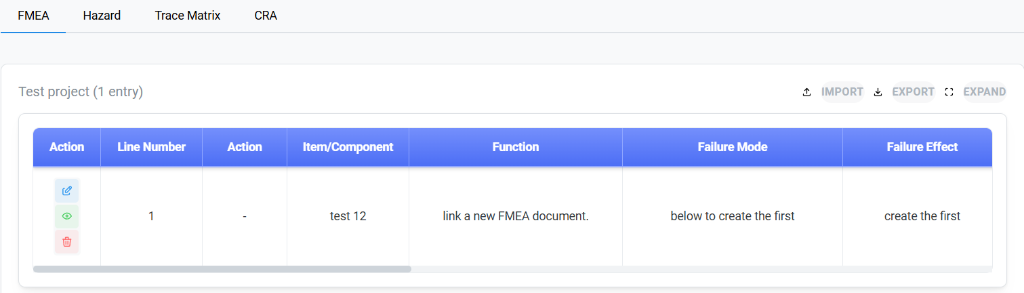
- Item/Component: Define the specific component under analysis (e.g., "test 12").
- Function: Describe the intended function of the component.
- Failure Mode: Detail the way in which the component might fail.
- Failure Effect: Analyze the potential consequences of that failure.
- Action: Use the edit (pencil), view (eye), or delete (trash) icons to manage entries.
3.2 Hazard Analysis
This module focuses on identifying hazards and assessing their severity, essential for safety-critical devices.
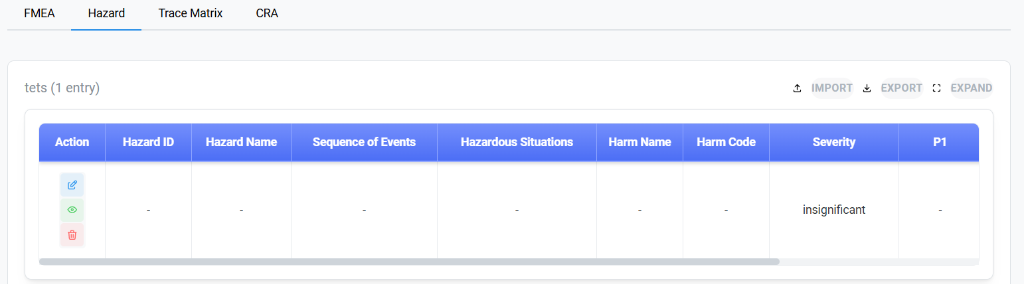
- Hazard ID & Name: Unique identifiers for the tracking hazard.
- Sequence of Events: Document the chain of events leading to the hazardous situation.
- Hazardous Situations: The specific condition that exposes people to property loss or damage.
- Harm Name & Code: Categorization of the potential harm.
- Severity: Assign a qualitative or quantitative severity score (e.g., "insignificant").
3.3 Traceability Matrix
The Trace Matrix ensures that every user need and design input is accounted for and verified.
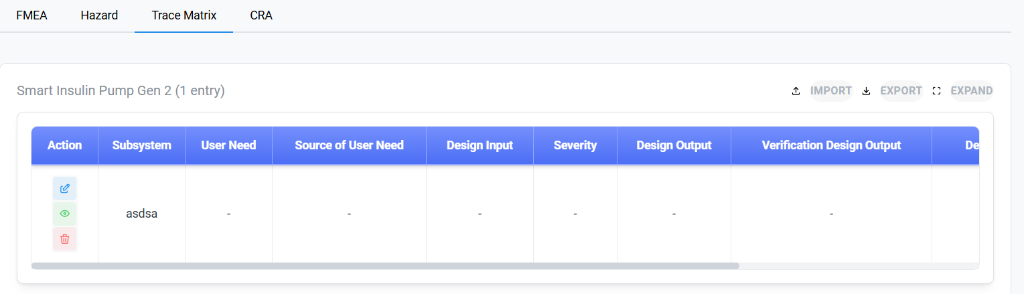
- Subsystem: The system area being traced.
- User Need: The high-level requirement from the user's perspective.
- Design Input: The specific engineering requirement derived from the user need.
- Severity / Design Output: Linkage to risk severity and the corresponding design artifacts.
- Verification: Ensure that the design output meets the input requirements.
3.4 Cybersecurity Risk Assessment (CRA)
The CRA module is dedicated to identifying and mitigating security vulnerabilities.
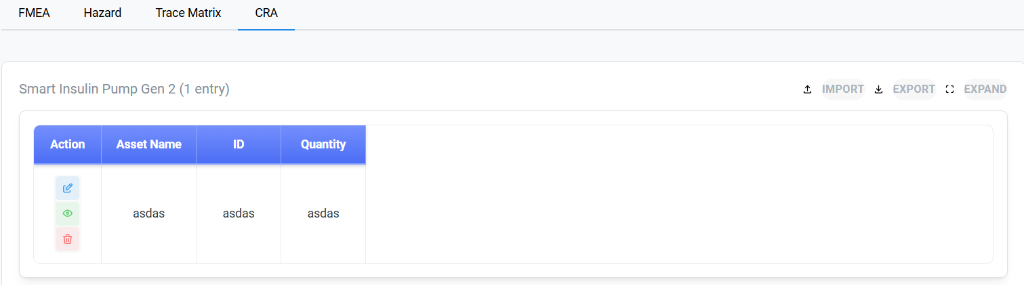
- Asset Name: The digital or physical asset being protected.
- ID: Unique identifier for the asset.
- Quantity: The number of assets deployed or at risk.
- Action: Manage the asset inventory and associated risk entries.
4. Entry Creation Methodology
Each module provides a dedicated form for capturing detailed risk data. Below are the specific fields required for each analysis type.
4.1 FMEA Entry Form
When adding a new FMEA entry, ensure all mandatory fields (marked with *) are populated to calculate the Risk Priority Number (RPN) correctly.
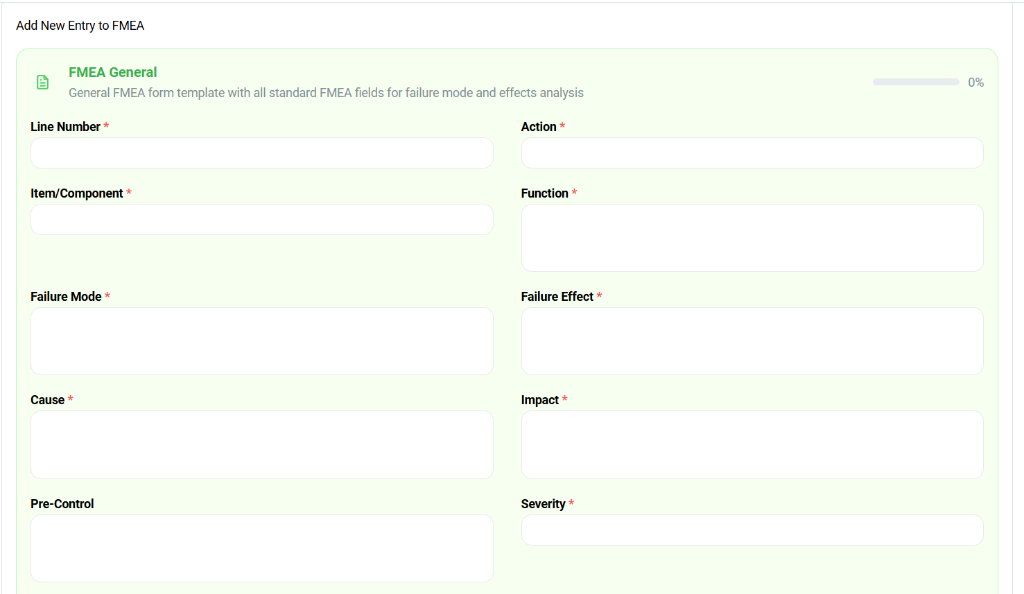
- Line Number: Auto-generated sequence number.
- Action: Define the mitigation action required (e.g., "Implement redundant sensor check").
- Item/Component: The hardware or software unit under review.
- Function: What is this component supposed to do?
- Failure Mode: How did it fail? (e.g., "Sensor drift").
- Failure Effect: What defines the impact of this failure?
- Cause: The root cause of the failure mode.
- Impact: Operational or clinical impact description.
- Pre-Control: Existing controls currently in place.
- Severity: Numeric score representing the seriousness of the failure effect.
4.2 Hazard Entry Form
Hazard entries focus on the chain of events leading to patient harm.
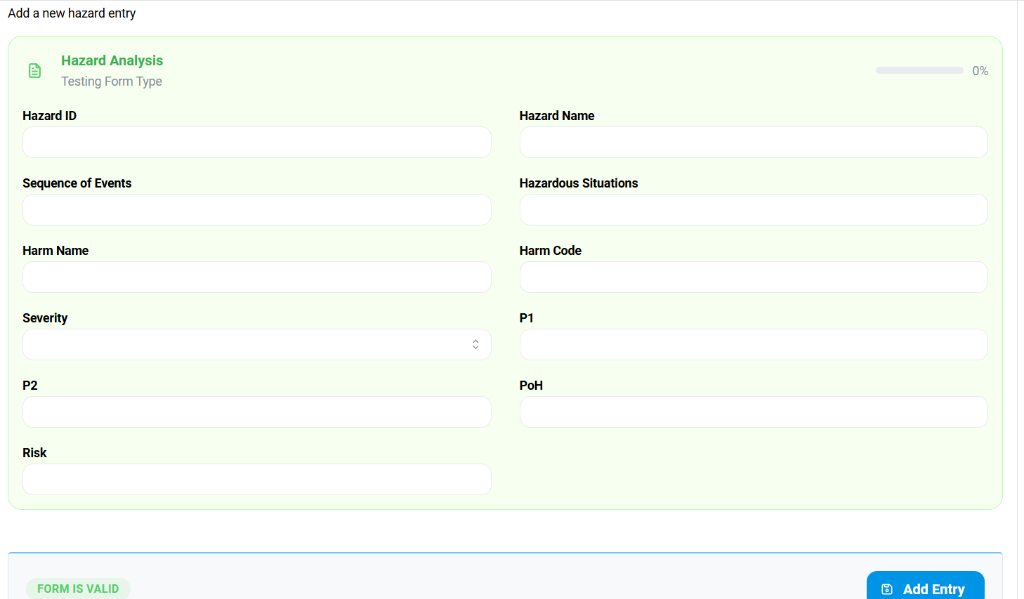
- Hazard ID & Name: Unique tracking ID (e.g., HAZ-001) and descriptive name.
- Sequence of Events: Step-by-step chronology leading to the hazard.
- Hazardous Situations: The specific condition exposing the patient/user to risk.
- Harm Name & Code: Standardized coding for the potential injury (e.g., IMDRF codes).
- Severity: Assessment of the potential injury's severity.
- P1 / P2 / PoH: Probability factors (Probability of hazardous situation occurring, Probability of harm).
- Risk: Calculated risk level based on Severity and Probability.
4.3 Trace Matrix Entry Form
For traceability, you must link design inputs to outputs and verification.
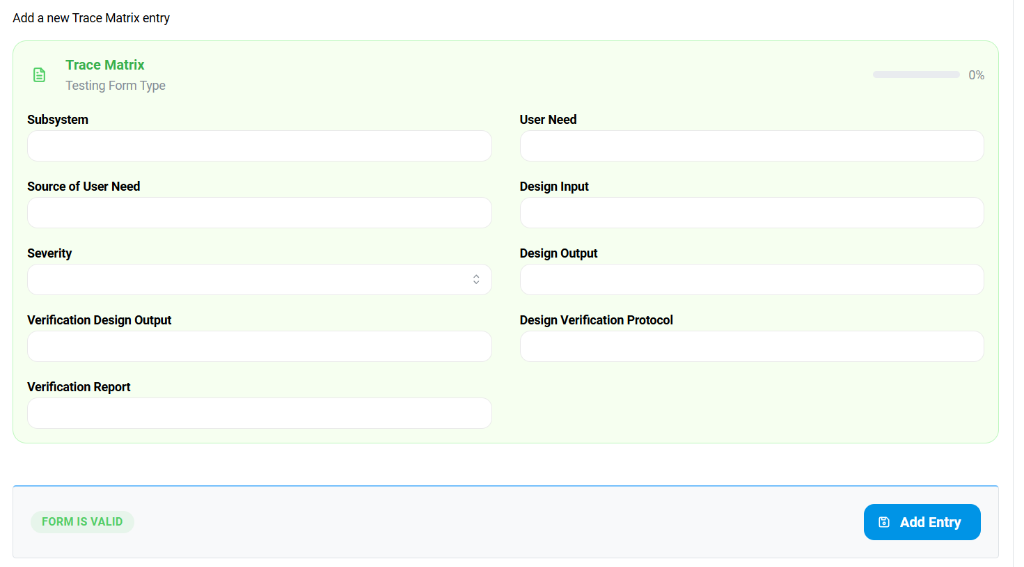
- Subsystem: Grouping for the requirement (e.g., "Power Management").
- User Need: The high-level stakeholder requirement.
- Source of User Need: Origin of the requirement (e.g., "Marketing MRD v2.0").
- Design Input: Technical specification derived from user need.
- Design Output: The artifact satisfying the input (e.g., "Architecture Spec v1.0").
- Verification Design Output: The test case or protocol used for verification.
- Design Verification Protocol & Report: Links to the executed test protocols and reports.
4.4 CRA Entry Form
Cybersecurity risks center on asset protection.
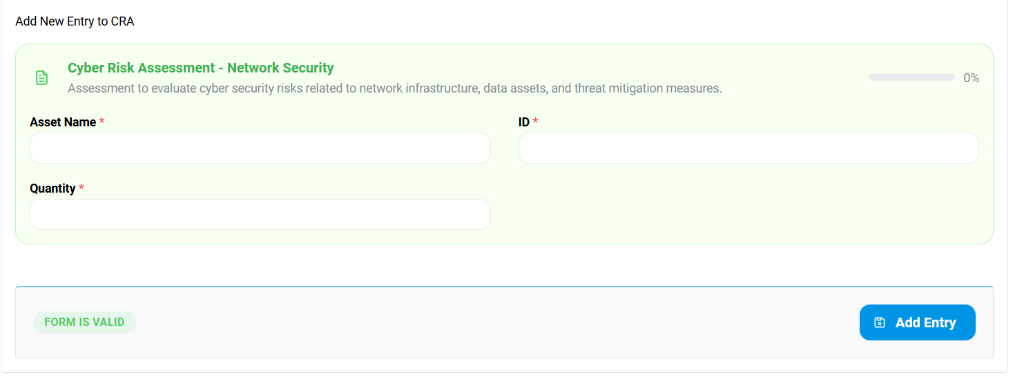
- Asset Name: The item being protected (e.g., "Patient Database", "WiFi Interface").
- ID: Unique asset identifier.
- Quantity: Number of instances of this asset in the system.