Failure Mode and Effects Analysis (FMEA)
Dashboard Overview
The FMEA module facilitates the systematic identification and mitigation of potential failure modes.
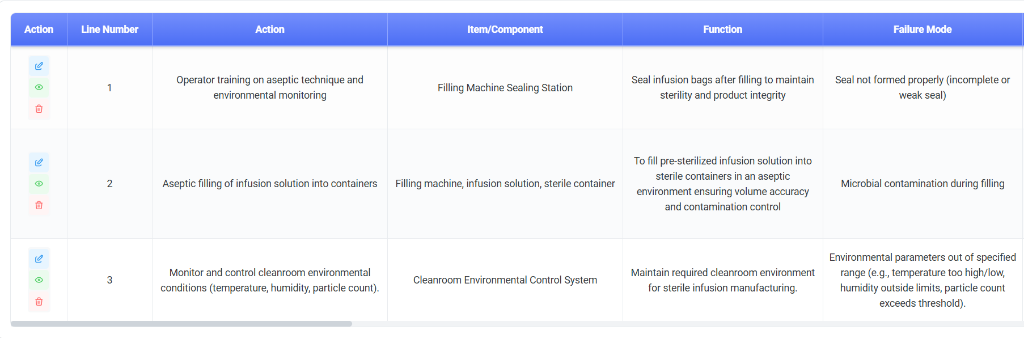
Dashboard Columns
- Process Step / Function: The operation or function being analyzed.
- Failure Mode: The specific way the process or product could fail.
- Failure Effect: The consequence of that failure on the end user.
- Current Controls: Existing measures to prevent or detect the failure.
- Grouping: Organize analysis by process step or system function for focused review.
- Listing Page: View a complete table of all failure modes, sort by RPN to prioritize high-risk items, and track mitigation status.
- AI Generation Reference: utilize AI to propose potential failure modes and causes based on component type and historical failure data.
Processing an Analysis
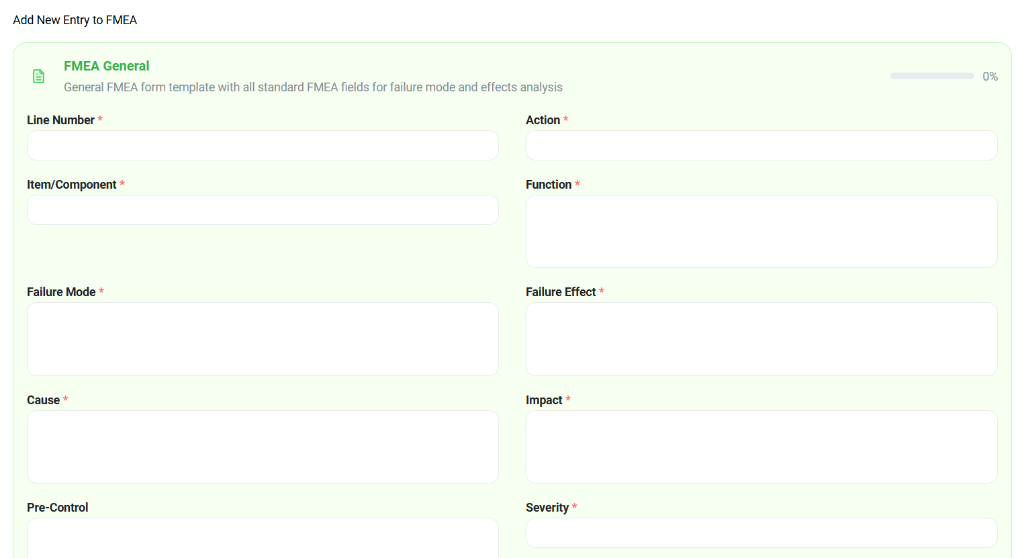
Detailed entry forms allow for precise scoring and documentation of each failure mode.
Key Data Points
- Item/Component & Function: Define what is being analyzed and its intended purpose.
- Failure Mode & Cause:
- Mode: The failure itself (e.g., "Seal not formed").
- Cause: The root reason (e.g., "Temperature too low").
- Scoring Fields:
- Severity (S): Impact of the failure.
- Occurrence (O): Likelihood of the cause occurring.
- Detection (D): Likelihood of detecting the failure before it reaches the user.
- RPN (Risk Priority Number): Calculated as $S \times O \times D$.
RPN
- Risk Priority Number = Severity × Occurrence × Detection.
- Use RPN thresholds to prioritize actions and reviews.
FMEA Structure
- Failure Mode: what can go wrong.
- Effects: outcomes to patient/product.
- Causes: root causes and contributing factors.
- Controls: current controls and recommended mitigations.