Trace Matrix
The Trace Matrix module ensures complete traceability between User Needs, Design Inputs, Design Outputs, and Verification activities.
Dashboard Overview
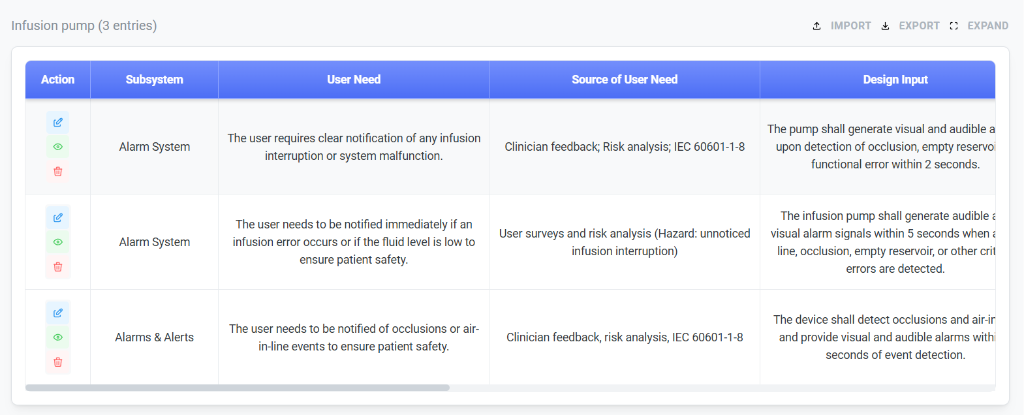
The dashboard provides a tabular view of all trace items, allowing for quick auditing and gap analysis.
Key Columns
- User Need: The high-level requirement or need expressed by the user.
- Source of User Need: Origin of the requirement (e.g., Risk Analysis, Clinician Feedback, Standards).
- Design Input: Technical requirements translated from user needs.
- Status Indicators: Visual icons (Edit, View, Delete) to manage individual entries.
- Verification Testing Link: Tracks the status of tests validating each requirement.
- Grouping: Group requirements by system component or regulatory standard (e.g., FDA, ISO 13485).
- Listing Page: Display a full matrix view showing the relationship between requirements, design, and verification.
- AI Generation Reference: Use AI to automatically map requirements to potential test cases and identify gaps.
Adding a Trace Entry
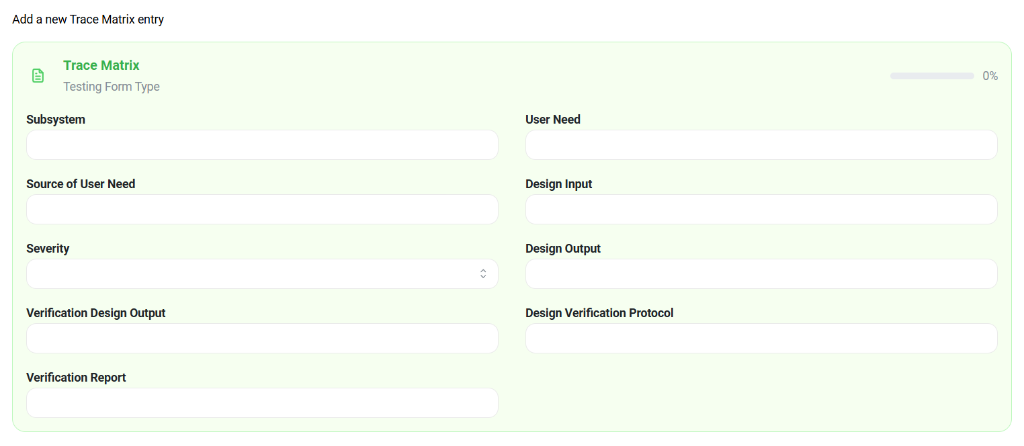
Use the detailed form to establish links between different stages of the design control process.
Form Fields
- Subsystem: usage area or component (e.g., Alarm System).
- User Need: A specific need statement (e.g., "User requires clear notification...").
- Design Input & Output:
- Design Input: The measurable requirement.
- Design Output: The specification or artifact that meets the input.
- Verification:
- Verification Design Output: The output being verified.
- Design Verification Protocol: The test protocol used.
- Verification Report: The results of the verification.